My Aquadeck
FAQ
Do you have questions about how MY AQUADECK works, creating an account, or placing and tracking orders? Then you’ve come to the right place. In these frequently asked questions, you will find all the information you need to get started with our new Aquadeck Configurator quickly and easily. This will enable you to get the most out of your projects and work faster and more accurately than ever before.

Account and login
Do I need an account for MY AQUADECK?
You can only use MY AQUADECK with a personal login.
Read also: How can I create an account on MY AQUADECK?
How can I create an account on MY AQUADECK?
Before you can start using our MY AQUADECK order tool, you need to request a new account. You can do this in 5 simple steps:
- Go to www.aquadeck.nl/my-aquadeck or myaquadeck.com and select “Request your login details”. Your application will be processed within two working days. If your application is approved, you will receive an invitation email from Aquadeck. Please check your spam folder if this email does not appear in your inbox.
- Click on ‘Create login’ in the email to start your registration.
- You will then receive a second email with a unique activation code.
- Enter the activation code and set a secure password.
- Please confirm your password by entering it a second time.
Once you have completed these steps, you can start using MY AQUADECK.
Can I log in with my login details from the old OrderTool?
You cannot log in to MY AQUADECK with your login details from the old OrderTool. Read also: How can I create an account on MY AQUADECK?
Support and documentation
Where can I go if I have questions about MY AQUADECK?
Do you have questions or need help with your first online configuration? Consult our FAQ page or view our Starter Guide. Can’t find what you’re looking for or want more information? Start a conversation via our live chat in MY AQUADECK, call us on +31 (0)495 430 317 or send an email to info@aquadeck.nl. We’re happy to help!
Read also: How can I chat with an Aquadeck employee?
Is there a manual available?
At www.aquadeck.nl/my-aquadeck, you will find a clear Starter Guide that will help you get started with MY AQUADECK.
How can I chat with an Aquadeck employee?
Do you see a green chat icon at the bottom right of your screen? That means an Aquadeck Sales Support employee is online. Theo, Tom, Rob or Emile are ready to help you with your questions.
If desired, you can grant us temporary access to your screen. This allows us to observe live and provide you with specific advice.
About MY AQUADECK
What is MY AQUADECK?
With MY AQUADECK, we are launching a brand new “Aquadeck Configurator”. As a swimming pool builder, you can quickly and easily put together a customised swimming pool cover, including options, price calculations and 3D visualisations. You immediately gain insight into quotations, orders and technical information, such as solar strength and installation dimensions. In short: it is your digital compass for optimally informing and inspiring your swimming pool customers. In combination with our fully automated machinery, we at Aquadeck can produce and deliver your automatic cover faster, easier and more efficiently! That is “close… to be perfect”!
What are the advantages of MY AQUADECK?
Quickly and easily configure your Aquadeck cover in 3D
Easily add options
Work efficiently thanks to automatic price calculation
Set the “no prices” mode to inspire end customers and configure their ideal cover on the spot.
Access a wealth of technical information: from manuals, roller diameters and installation dimensions to detailed information about the solar strength of your slats.
View all your orders and order history at a glance
MY AQUADECK inspires, facilitates and informs
Who can use MY AQUADECK?
MY AQUADECK has been developed exclusively for professional swimming pool builders who are customers of Aquadeck.
What is the difference between a distributor and a sub-distributor?
Your PPG distributor is your first point of contact for an Aquadeck cover.
As a pool builder, you order your Aquadeck cover through this PPG distribution company. In MY AQUADECK, we refer to the PPG distribution company as the ‘Distributor’ and you, as the pool builder, as the ‘Subdistributor’.
The sub-distributor purchases Aquadeck products from the distributor and then sells or installs them for the end customer.
Ordering and configuration
What are the different steps in the ordering process?

Quotation
When you create a new project and add a configuration, it automatically enters the ‘Quotation’ status.
Step 1
Is your configuration ready, but are you still waiting for final approval from your swimming pool customer, for example? Then you can save your configuration here. Please note: as long as your project is in this phase, it has not been ordered.
Ordered by sub-distributor
Is your configuration 100% ready? Place your order by clicking on the “Place an order” button. Enter your order details and confirm your order. Your project will then move to the “Ordered by sub-distributor” stage. From this point onwards, you don’t need to do anything else. Your PPG distribution company and Aquadeck will get to work on your cover.
Please note: once you have placed your order, no further changes can be made. If you still wish to make changes, the order must be cancelled and re-entered. Please bear in mind that this will extend the delivery time, as the schedule will need to be re-drawn up.
Step 2
As soon as your PPG distributor forwards your order to Aquadeck, your project will move on to “step 2”.
Step 3
Aquadeck staff will thoroughly review your project. If they have any questions or comments, they will contact you.
Step 4
After final confirmation of your order (both to you and to your PPG distributor), your project enters the final phase: step 4. We always ensure correct and fast production and dispatch of your order.
Can I change an ordered cover afterwards?
Once you have placed your order, no further changes can be made. If you still wish to make changes, the order must be cancelled and re-entered. Please note that this will extend the delivery time, as the schedule will need to be re-created.
Where can I find the price of my configuration?

MY AQUADECK automatically calculates the gross price of your configuration and immediately applies your discount. Please note: prices are not displayed on the screen, but are only visible on documents.
Follow these steps to generate your quotation:
- Click on ‘Print quote’
- Select the desired template (document type) and language
- Click on ‘Create document’
- Select ‘Generate document’
Your quotation with all prices is now being generated as a document.
How can I generate a quotation with gross prices (without discounts)?
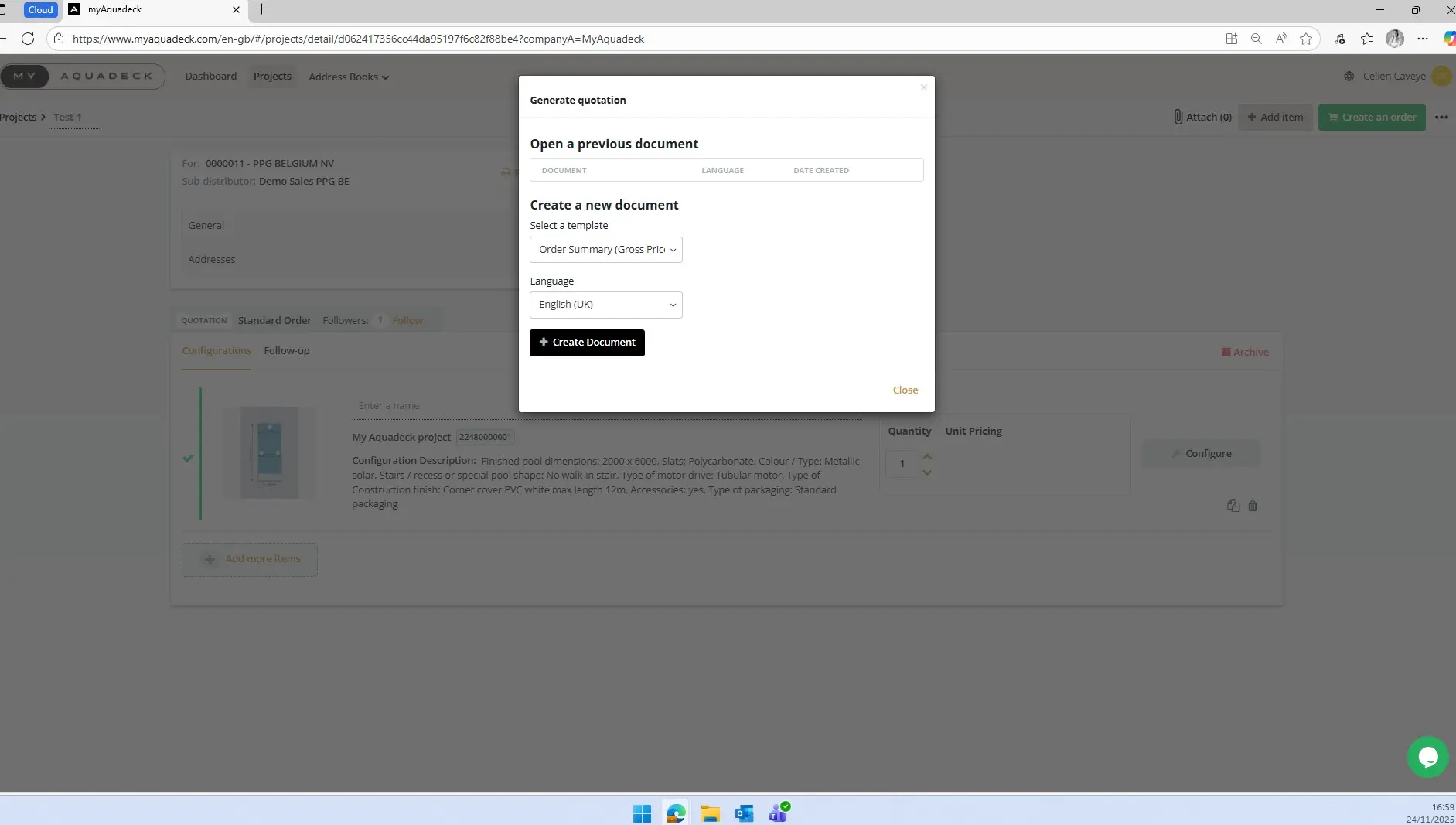
Follow these steps to generate your quotation with gross prices:
- Click on ‘Print quote’.
- Select the template ‘Quotation Summary (Gross)’ and the language.
- Click on ‘Create document’.
- Select ‘Generate document’.
Can I copy quotations/orders?

MY AQUADECK offers the option to copy quotations. Copy your quotation and then adapt it for another project. This is very convenient. Orders cannot be copied because each order is unique and can only occur once.
Switching from the old OrderTool
Where can I find orders that I placed via the old OrderTool?
In your account on MY AQUADECK, you will find an overview of all quotations, current orders, and your order history from 12 May 2025 onwards. Orders placed before 12 May 2025 can be found in the “old OrderTool”.
Can I still place orders using the old OrderTool?
You can place orders via the “old” OrderTool until 31 January 2026. After that, you will only be able to view your order history. We encourage you to switch to MY AQUADECK as soon as possible. Don’t wait too long, because MY AQUADECK makes your work faster, more accurate and a lot easier!
Manage project and customer data
How can I change my delivery and/or billing address?

You can change your delivery or billing address during the ordering process. Would you like to change your default delivery and/or billing address? Select “Address lists” in the main menu and edit the details there.
Where can I monitor the status of my projects?
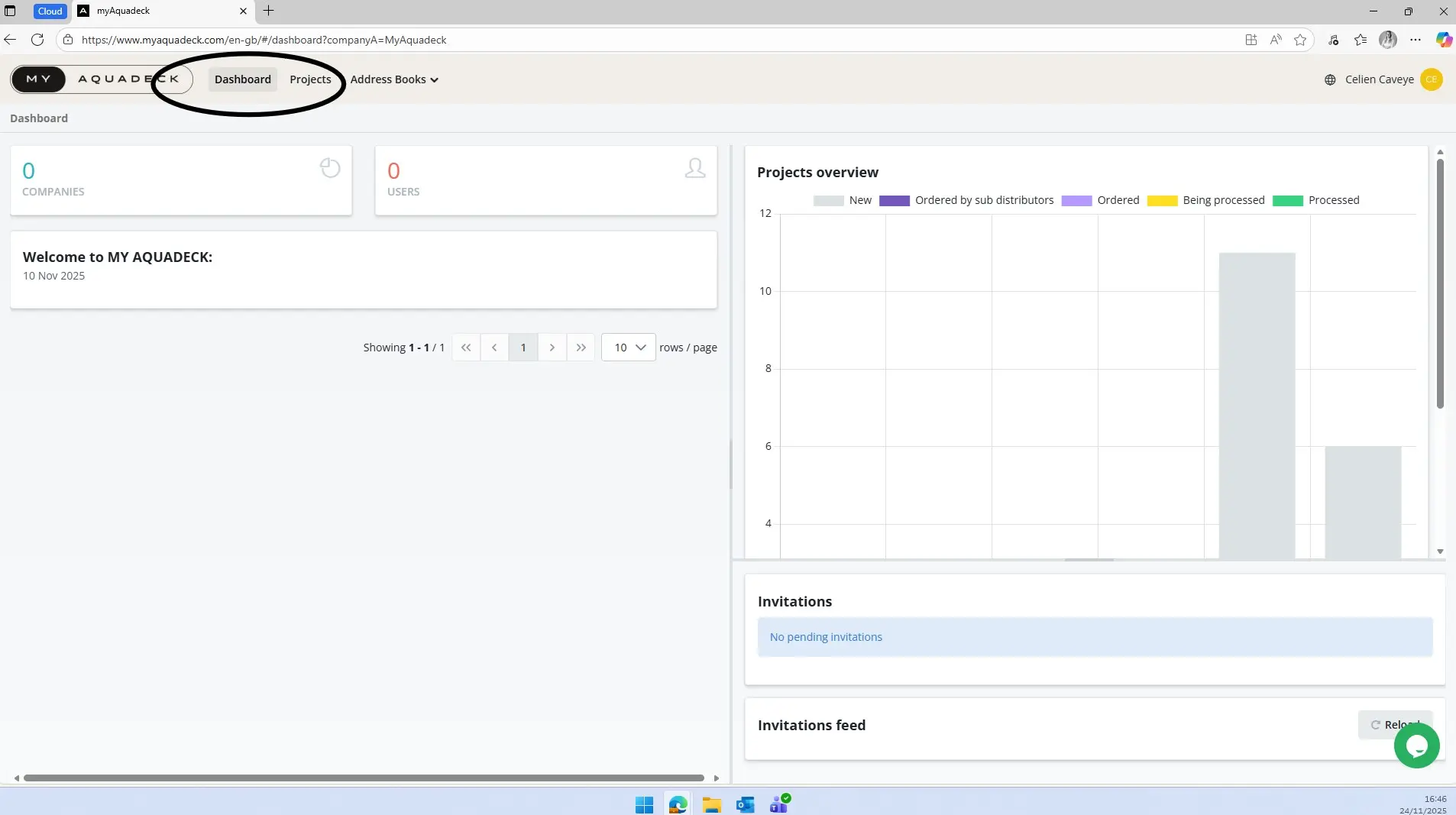
You can monitor the status of your projects at any time in the MY AQUADECK dashboard.
Will my customer details be stored?
sales agreement, Regulation (EU) 2016/679 and EU Directive 95/46/EC apply, hereinafter referred to as ‘Privacy Legislation’. The customer is the controller.
controller within the meaning of the Privacy Legislation and is therefore the person who determines the purpose of and the means for the processing of personal data.
Aquadeck is solely a processor within the meaning of the Privacy Legislation and processes personal data solely for the benefit of or on behalf of the customer. The parties, respectively as controller and processor, declare that they will comply with the Privacy Legislation.
The customer fully indemnifies Aquadeck against all direct and indirect damage and costs, including legal or solicitor’s fees, for all claims from third parties in this regard. The customer declares that they have taken note of the privacy disclaimer on our website.
Didn't find what you were looking for?
Please do not hesitate to contact Aquadeck. Send an email to salessupport@aquadeck.nl or use the chat function at the bottom right of your screen.